Use cases

What can you build?

Nine project ideas, from simple to more advanced. One is a real app built with ytapis. Each idea says what it needs, and a status tag tells you whether it works today. Copy a build prompt to start with an AI helper.

Works today Needs an endpoint that is empty right now Let an AI agent build it →
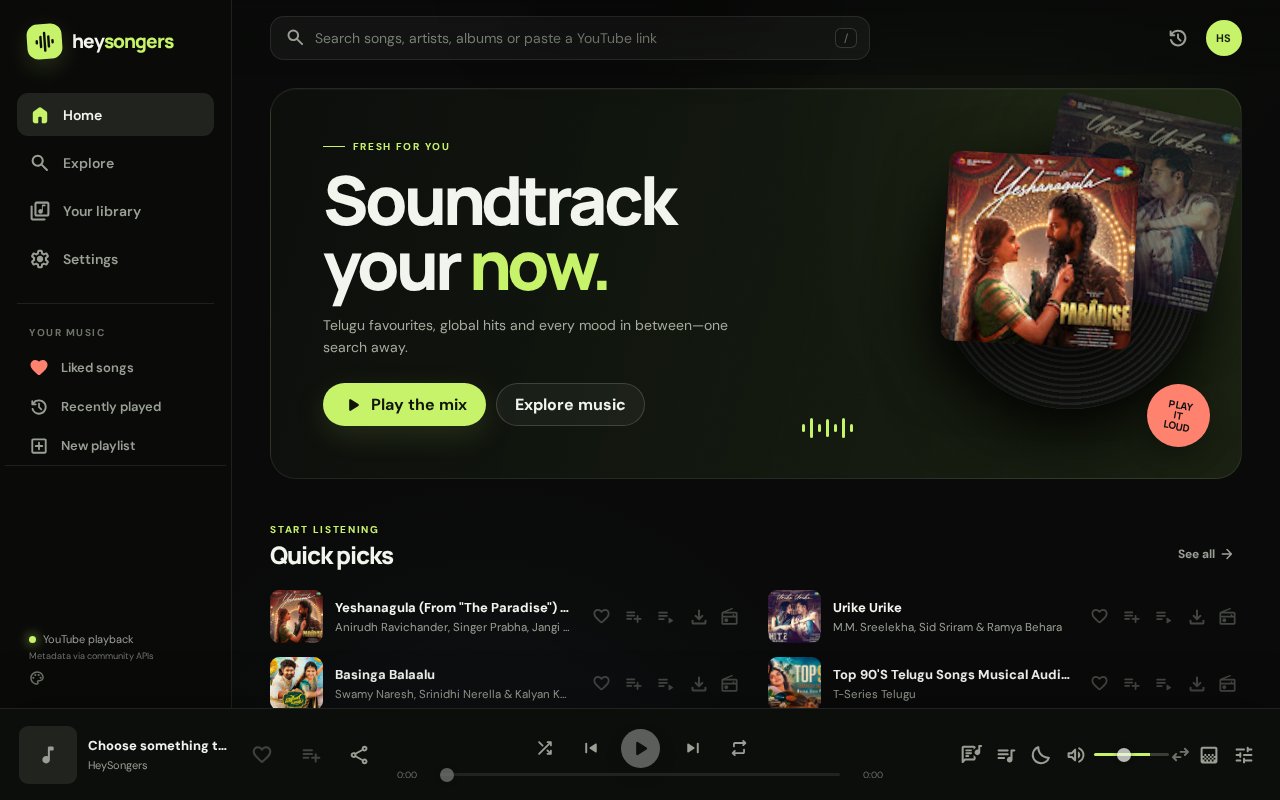
HeySongers home screen: a dark music player with a featured mix, quick picks and a now-playing bar

Featured · HeySongers music app

Live · checked 9 Oct 2026

A music streaming web app for Telugu favourites, global hits and every mood. Search songs, albums, playlists and artists, or paste a YouTube link to play it. Built with ytapis, and a good model for a search-first music product.

  • Search songs, albums, playlists and artists
  • Paste a YouTube link to play it
  • Liked songs, playlists and queue
  • Import Spotify or YouTube Music playlists
  • Equalizer, sleep timer and playback speed
  • Offline notice with saved music still visible
SearchPlaylistsQueueEqualizerSleep timerOffline
Open HeySongers ↗

The live app is a third-party project. Its source is not part of this site. The build prompt is a starting point for a similar search-and-play app.


AI robot reading video thumbnails

1 · AI video summarizer

Transcript empty today: falls back to description

Pick a video, fetch its transcript, and send the text to any LLM for bullet summaries, chapters or quiz questions. When the transcript is empty, the code falls back to the video description so the app still works.

GET /video/:idGET /video/:id/transcript
summarize.mjs
const API = 'https://ytapis.djalokyt27.workers.dev';

async function getJson(path) {
  const res = await fetch(API + path);
  if (!res.ok) throw new Error(`HTTP ${res.status}`);
  return res.json();
}

const video = await getJson('/video/dQw4w9WgXcQ');
const transcript = await getJson('/video/dQw4w9WgXcQ/transcript?lang=en');

// Transcripts can be empty: fall back to the description
const source = transcript.length
  ? transcript.map(t => t.text).join(' ')
  : video.description;

const prompt = `Summarise this video in 5 bullet points.\n\nTitle: ${video.title}\n\n${source}`;
// Send `prompt` to your LLM. Keep the LLM key on your server, never in the browser.
Glowing analytics dashboard

2 · Keyword trend dashboard

Works today

Track several keywords, compare the median view count of the top results, and export a CSV for a spreadsheet or chart. Great for content planning and market research.

GET /?q=&limit=viewCountRawdurationSeconds
trends.py
import csv, statistics, time
import requests

API = "https://ytapis.djalokyt27.workers.dev"
KEYWORDS = ["home workout", "meal prep", "budget travel"]

rows = []
for kw in KEYWORDS:
    videos = requests.get(f"{API}/", params={"q": kw, "limit": 15}, timeout=20).json()
    for v in videos:
        rows.append({"keyword": kw, "title": v["title"], "channel": v["author"],
                     "views": v["viewCountRaw"], "seconds": v["durationSeconds"]})
    time.sleep(0.5)  # be polite between requests

if not rows:
    raise SystemExit("No results came back. Try again later.")

with open("trends.csv", "w", newline="", encoding="utf-8") as f:
    writer = csv.DictWriter(f, fieldnames=rows[0].keys())
    writer.writeheader()
    writer.writerows(rows)

for kw in KEYWORDS:
    views = [r["views"] for r in rows if r["keyword"] == kw]
    print(kw, "median views:", int(statistics.median(views)) if views else 0)
Creator studio at night

3 · Live stream alert bot

Works today

Poll the live status of the streams you care about and post to Discord or Telegram the moment one goes live. The script only alerts on the transition, so you do not get spammed.

GET /video/:id/liveisLiveviewerCountStr
live-alert.mjs
const API = 'https://ytapis.djalokyt27.workers.dev';
const WATCH = ['jfKfPfyJRdk'];                  // video IDs to monitor
const WEBHOOK = process.env.DISCORD_WEBHOOK_URL; // keep secrets in env vars
const wasLive = new Map();

async function check(id) {
  const info = await (await fetch(`${API}/video/${id}/live`)).json();
  if (info.isLive && !wasLive.get(id)) {         // alert on the transition only
    await fetch(WEBHOOK, {
      method: 'POST',
      headers: { 'Content-Type': 'application/json' },
      body: JSON.stringify({ content: `Live now: https://www.youtube.com/watch?v=${id} (${info.viewerCountStr} watching)` })
    });
  }
  wasLive.set(id, info.isLive);
}

const tick = () => WATCH.forEach(id => check(id).catch(console.error));
tick();
setInterval(tick, 60_000);                       // once a minute is polite

4 · Title & keyword research

Works today

Count which words show up most in the titles that rank for a query. A quick way to find angles for your next video or blog post.

GET /?q=
keywords.js (browser console or module)
const API = 'https://ytapis.djalokyt27.workers.dev';
const stop = new Set(['the', 'and', 'for', 'with', 'how', 'you', 'your', 'this', 'that']);

async function topWords(query) {
  const videos = await (await fetch(`${API}/?q=${encodeURIComponent(query)}&limit=15`)).json();
  const counts = {};
  for (const v of videos) {
    for (const w of v.title.toLowerCase().match(/[a-z']+/g) || []) {
      if (w.length > 2 && !stop.has(w)) counts[w] = (counts[w] || 0) + 1;
    }
  }
  return Object.entries(counts).sort((a, b) => b[1] - a[1]).slice(0, 10);
}

console.log(await topWords('python tutorial'));

5 · Shorts feed page

Works today

A vertical-style grid of Shorts for any topic, built from the embedUrl field. Good for a hobby site or a bookmarklet.

GET /shorts?q=embedUrl
shorts.html
<div id="feed" style="display:flex;gap:12px;overflow-x:auto"></div>
<script type="module">
  const API = 'https://ytapis.djalokyt27.workers.dev';
  const shorts = await (await fetch(`${API}/shorts?q=cooking&limit=10`)).json();
  const feed = document.getElementById('feed');
  for (const s of shorts) {
    const f = document.createElement('iframe');
    f.src = s.embedUrl;
    f.title = s.title;
    f.loading = 'lazy';
    f.width = 200; f.height = 355;
    f.allow = 'encrypted-media; picture-in-picture';
    feed.append(f);
  }
</script>

6 · Browser extension popup

Works today

Click the toolbar icon on any video to see its title, views and live status. Needs tabs permission and this API in host_permissions.

GET /video/:idGET /video/:id/stats
popup.js
const API = 'https://ytapis.djalokyt27.workers.dev';
const [tab] = await chrome.tabs.query({ active: true, currentWindow: true });
const id = new URL(tab.url).searchParams.get('v');
if (!id) throw new Error('Open a YouTube video first');

const [video, stats] = await Promise.all([
  fetch(`${API}/video/${id}`).then(r => r.json()),
  fetch(`${API}/video/${id}/stats`).then(r => r.json()),
]);
document.querySelector('#title').textContent = video.title;
document.querySelector('#views').textContent = stats.views.toLocaleString() + ' views';

7 · Search YouTube from your AI chat

Needs the npm override

Give Claude Desktop or another MCP client a YouTube search tool. Install the packages with the override from the Libraries page, then add the server to your client config.

ytapis-mcpytapis-core@2.0.0
claude_desktop_config.json (MCP server entry)
{
  "mcpServers": {
    "ytapis": {
      "command": "node",
      "args": ["/absolute/path/to/ytapis-tools/node_modules/ytapis-mcp/dist/index.js"]
    }
  }
}

8 · Study playlist player

Works today

Search a focus topic, list the results, and play them one by one in an embedded player. Build a personal study or focus page in an afternoon.

GET /?q=embedUrl
player.js
const API = 'https://ytapis.djalokyt27.workers.dev';
const videos = await (await fetch(`${API}/?q=lofi%20study%20music&limit=10`)).json();

const player = document.querySelector('#player');   // an <iframe>
const list = document.querySelector('#list');       // a <ul>
videos.forEach((v, i) => {
  const li = document.createElement('li');
  li.textContent = `${i + 1}. ${v.title} (${v.duration})`;
  li.onclick = () => { player.src = v.embedUrl; };
  list.append(li);
});
player.src = videos[0]?.embedUrl ?? '';

Have a different idea?

Describe it to your AI agent with the master prompt and it will scaffold the project using only the real endpoints.